Turn the WordPress.com Reader into a hands-free traffic machine.
Siteplot WP Traffic Generator automatically likes, follows, and comments on targeted WordPress.com posts — bringing real readers back to your site while you work on content and clients.
Desktop app that runs on your own machine. Optional AI comments with local Ollama — no external AI API required.
What it does for you?
Think of it as a dedicated assistant that lives in WordPress.com Reader: it discovers posts in your niche, engages intelligently, and keeps your brand visible every day.
How Siteplot WP Traffic Generator works
Install & connect once
Install Node.js, download the app, run npm install, and log in to WordPress.com
through the built-in browser. Your session lives on your machine just like a normal browser.
Choose tags & safe limits
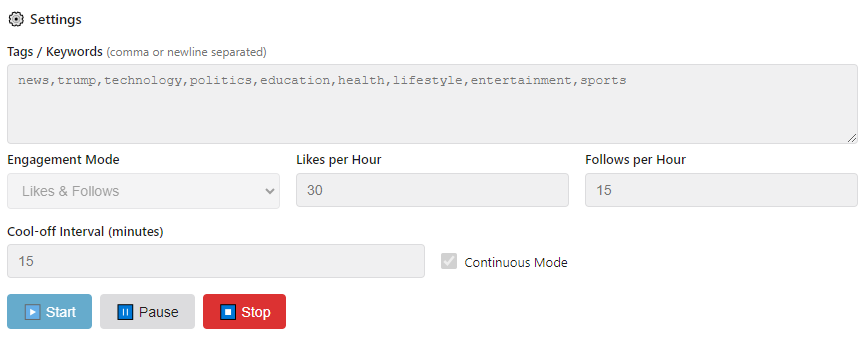
Add tags/keywords that match your niche — like food blog, personal finance, travel — and set hourly caps for likes, follows, and comments so your pattern stays human.
Hit Start & let it compound
The app cycles through your tags in WordPress.com Reader, finds relevant posts, and automatically likes, follows, and comments — with detailed stats after every run.
Built to grow your audience without babysitting Reader
Tag-based targeting
Enter your tags once and let the app find fresh posts for you. Engagement is spread across tags so your activity looks organic, not robotic.
Automated likes & follows
Automatically like posts and subscribe to blogs that match your niche and goals. You control the maximum actions per hour.
AI-powered comments with Ollama
Enable optional AI comments powered by a local Ollama model. Comments are short, contextual, and generated on your machine — no external AI bill.
Rate limiting & cool-off intervals
Configure likes, follows, and comments per hour plus cool-off intervals between runs so your account behaves like a real person who dips in and out of Reader.
Continuous mode
Turn on continuous mode and let the app loop automatically: run, rest, run again — keeping you in front of new readers without manual effort.
Dashboard stats & log
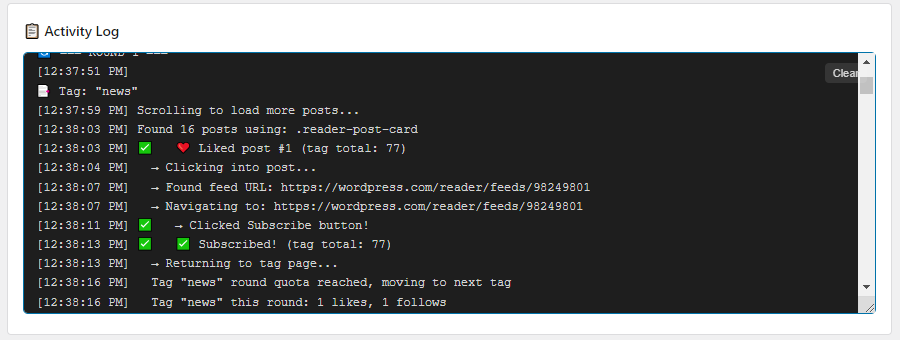
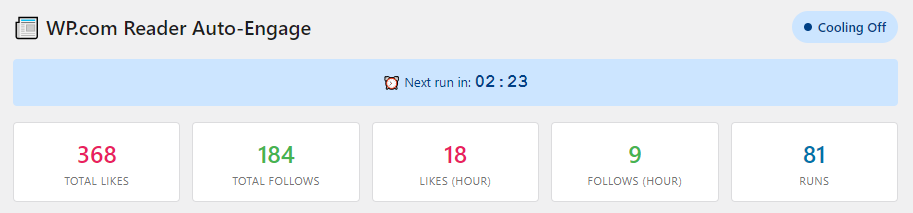
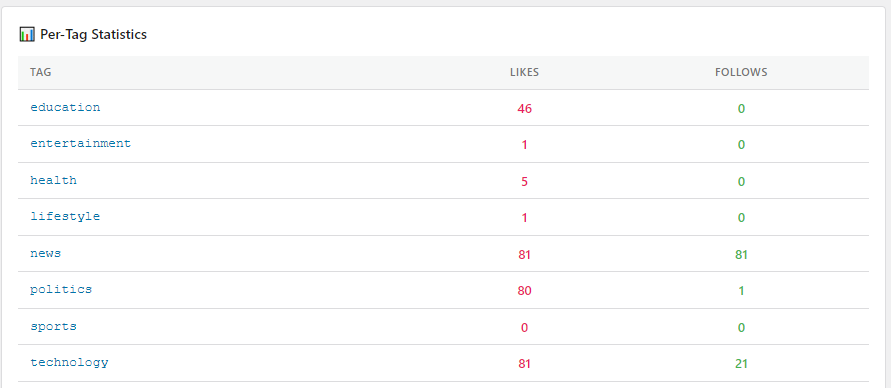
See total likes, follows, comments, runs, and a per-tag breakdown, plus a live activity log so you always know exactly what the app is doing.
See Siteplot WP Traffic Generator in action
Replace this video with your actual walkthrough once it’s uploaded to YouTube.
A dashboard built for daily use
Tag & rate settings
Dashboard stats
Per-tag breakdown & log
You have complete control with the Auto-Engage dashboard.
Choose how hands-on you want us to be
- Full Siteplot WP Traffic Generator license
- Setup guide and best-practice checklist
- Perfect if you’re comfortable following tech instructions
- Everything in Solo Creator
- Hands-on install of Node.js & the app on your machine
- We configure everything for your niche
- Everything in Pro Setup
- Niche & tag strategy based on your goals
- Run on our servers 24x7 (hands-free)
Choose the plan that best suits your needs.
Common questions about Siteplot WP Traffic Generator
The app uses a real Chromium browser and logs in like you do. You control the limits, and we recommend conservative settings that mimic a real user’s behavior over time.
No. Likes and follows work without Ollama. You only need Ollama if you want AI-generated comments. When enabled, everything runs locally on your machine.
Siteplot WP Traffic Generator runs on Windows, macOS, and Linux as long as you can install Node.js and the Chromium engine used by the app.
Yes. You set separate limits for likes/hour, follows/hour, comments/hour, and the cool-off interval between runs. You’re always in control.
No. It doesn’t publish to your blog. It focuses purely on Reader-side engagement: liking, following, and commenting on other posts so those readers discover you.
The Pro Setup and Agency Launch tiers include hands-on help. Even with the DIY tier, you get documentation and a clear checklist to follow step by step.
Ready to put WordPress.com Reader traffic on autopilot?
Install Siteplot WP Traffic Generator once, dial in your tags and limits, and let it quietly grow your audience in the background while you create.